
The strain wave gear, also known as a harmonic drive, represents a pivotal innovation in mechanical power transmission, emerging in the late 1950s to meet the stringent demands of aerospace applications. Its unique operating principle, relying on the elastic deformation of a flexible component, grants it exceptional advantages over conventional gearing systems. My exploration into this technology is driven by the need for efficient design methodologies. The core appeal of the strain wave gear lies in its remarkable combination of high reduction ratios within a single stage, exceptional positional accuracy and repeatability, compactness, low weight, and near-zero backlash. These attributes have cemented its role not only in space mechanisms and optical instrumentation but also in robotics, medical devices, and precision industrial machinery.
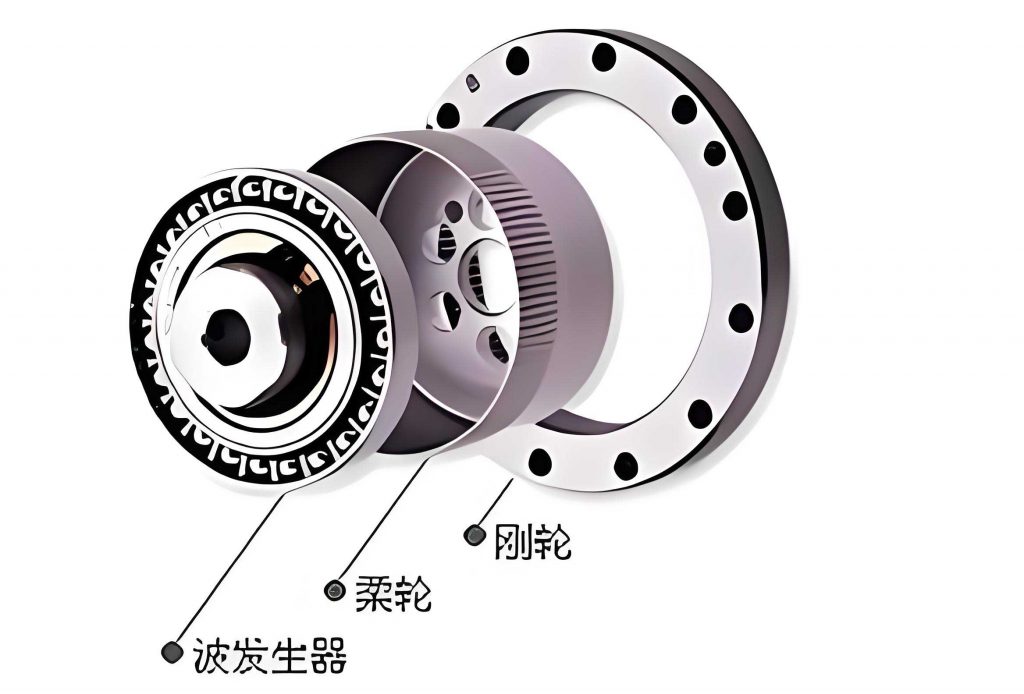
The fundamental architecture of a strain wave gear assembly is elegantly simple, comprising only three primary components: the Flexspline (a thin-walled, flexible external gear), the Circular Spline (a rigid internal gear), and the Wave Generator (an elliptical bearing assembly). Despite this simplicity, the performance and longevity of the transmission are governed by a complex interplay of numerous geometric, material, and operational parameters. Traditional design processes, which involve manual calculations and iterative modeling, are time-consuming and prone to error. Therefore, implementing a parametric design system is crucial for enhancing design efficiency, ensuring quality, and significantly shortening the product development cycle for strain wave gear systems.
Fundamental Principles and Parametric Design Framework
The operation of a strain wave gear is based on controlled elastic deformation. The Wave Generator, upon rotation, deforms the Flexspline into an elliptical shape, causing its external teeth to engage with the internal teeth of the Circular Spline at two diametrically opposite regions. The key to its high reduction ratio is the tooth count difference between the Flexspline and the Circular Spline. For each full rotation of the Wave Generator, the Flexspline rotates relative to the Circular Spline by an angle corresponding to this tooth difference. The gear reduction ratio, \( i \), is given by:
$$ i = -\frac{N_f}{N_c – N_f} $$
where \( N_f \) is the number of teeth on the Flexspline and \( N_c \) is the number of teeth on the Circular Spline. The negative sign indicates that the input (Wave Generator) and output (Flexspline) rotate in opposite directions when the Circular Spline is fixed.
Parametric design automates the derivation of all component dimensions from a set of initial performance requirements. The core input parameters typically include:
| Parameter Category | Symbol | Description |
|---|---|---|
| Performance Requirements | \( i \), \( T_{out} \), \( n_{in} \) | Gear ratio, output torque, input speed. |
| Gear Geometry | \( m \), \( \alpha \), \( x \) | Module, pressure angle (usually 20°), profile shift coefficient. |
| Flexspline Definition | \( N_f \), \( d_f \), \( \Delta \) | Number of teeth, nominal diameter, initial deformation wave amplitude. |
From these inputs, a comprehensive set of design parameters for all three components is calculated. The Flexspline, being the critical and most complex component, requires detailed structural definition beyond its tooth geometry. Its design parameters can be categorized as follows:
| Parameter Group | Example Parameters |
|---|---|
| Basic Gear Data | Flexspline tooth count (\(N_f\)), module (\(m\)), pitch diameter (\(d_{pf}\)), addendum diameter (\(d_{af}\)), dedendum diameter (\(d_{df}\)), tooth height (\(h_f\)). |
| Structural Dimensions | Cylindrical shell inner diameter (\(d_i\)), diaphragm/cup thickness (\(t_s\)), overall length (\(L\)), tooth ring width (\(b_f\)), flange thickness (\(t_{fl}\)). |
| Material & Deformation | Young’s modulus (\(E\)), allowable bending stress (\([\sigma_b]\)), initial wave generator deflection (\(\Delta\)). |
The pitch diameter of the Flexspline is \( d_{pf} = m \cdot N_f \). The addendum and dedendum diameters are calculated considering the profile shift coefficient \( x \) and clearance:
$$ d_{af} = d_{pf} + 2m(1 + x) $$
$$ d_{df} = d_{pf} – 2m(1.25 – x) $$
The initial deformation \( \Delta \) is a critical factor for stress and engagement; it is often a function of the module and tooth geometry.
Implementation Strategy Using UG Secondary Development
To operationalize this parametric design process, I utilize the secondary development capabilities of Siemens NX (formerly Unigraphics UG). NX provides a powerful suite of tools under the UG/Open umbrella for customization and automation. Among the available approaches, I have selected a method that offers maximum flexibility for the complex geometry of a strain wave gear. This involves creating a dedicated user interface dialog using UG/Open UIStyler and driving all logic, calculations, and modeling operations through programs written in UG/Open API (a C-language interface) combined with Microsoft Visual C++. This method is superior for unique, complex components like the Flexspline compared to simpler record-and-playback parametric modeling.
The development environment must be carefully configured. The essential setup steps include:
- Installing Siemens NX with the UG/Open and UG/Open++ modules.
- Creating a dedicated project directory (e.g.,
D:\Harmonic_Design) withstartupandapplicationsubfolders. - Setting the system environment variable
UGII_USER_DIRto point to the project directory. This allows NX to automatically load custom menus and applications upon startup.
The overarching development workflow is systematic and follows several key stages, as outlined below:
| Phase | Activity | Tools Used |
|---|---|---|
| 1. Planning & Design | Define input/output parameters, calculation logic, and UI layout. | – |
| 2. Interface Creation | Build dialog windows with controls (buttons, input fields). | UG/Open UIStyler |
| 3. Menu Integration | Create custom menu items in the NX main menu bar. | UG/Open MenuScript |
| 4. Program Development | Write code for calculations, callbacks, and 3D modeling. | UG/Open API, Visual C++ |
| 5. Compilation & Linking | Build the code into a dynamically linked library (DLL). | Visual Studio Compiler |
| 6. Deployment & Testing | Place files in the project directory and run within NX. | Siemens NX |
Core Development Techniques and Key Functions
Creating the User Interface
The first step is integrating the functionality into the NX interface. Using UG/Open MenuScript, a simple script file (.men) defines a new top-level menu.
VERSION 170
EDIT UG_GATEWAY_MAIN_MENUBAR
BEFORE UG_HELP
CASCADE_BUTTON MY_HARMONIC_MENU
LABEL Harmonic Drive Design
END_OF_BEFORE

MENU MY_HARMONIC_MENU
BUTTON MY_DESIGN_DIALOG
LABEL Design a New Strain Wave Gear...
ACTIONS harmonic_design.dlg
END_OF_MENU
This script places a “Harmonic Drive Design” menu next to the Help menu, containing an item that launches the main design dialog.
The interactive dialog is built with UG/Open UIStyler, a visual tool for placing controls like real number inputs, integer inputs, buttons, and labels. The dialog is saved as a .dlg resource file. Its controls are linked to specific callback functions in the C++ code. A representative dialog structure for initial parameters is summarized below:
| Control Type | Object Name | Label | Linked Callback |
|---|---|---|---|
| Real Number Input | INPUT_RATIO | Gear Ratio (i): | – |
| Real Number Input | INPUT_TORQUE | Output Torque (Nm): | – |
| Integer Input | INPUT_TEETH_FLEX | Flexspline Teeth (Nf): | OnTeethChanged |
| Option Menu | OPTION_MODULE | Module (m): | – |
| Push Button | BUTTON_OK | OK | OnOkPressed |
| Push Button | BUTTON_CANCEL | Cancel | OnCancelPressed |
Program Architecture and Critical Calculations
The program logic is encapsulated in a Visual C++ project that creates a DLL. The entry point for a NX external application is the ufsta function. This function initializes the connection to NX, registers the dialog callbacks, and then terminates.
The most critical part of the code is the calculation engine that translates user inputs into component dimensions. For the Flexspline, this involves sequential calculations for gear geometry, strength verification, and structural sizing. A simplified algorithmic flow for the Flexspline design function, caculateFlexspline(), is as follows:
- Derive Tooth Counts: From the desired gear ratio \( i \) and a chosen Flexspline tooth count \( N_f \), calculate the Circular Spline tooth count: \( N_c = N_f + 2 \). Verify the actual ratio matches the requirement within tolerance (e.g., \( |(i_{actual} – i)/i| < 0.04 \)).
- Preliminary Sizing from Torque: The core diameter of the Flexspline’s cylindrical shell is often initially estimated from torsional load and allowable shear stress, or more specifically from the combined bending-torsion stress due to the wave generator deflection. An empirical formula might be used:
$$ d_{core} \approx \sqrt[3]{\frac{K_t \cdot T_{out}}{\tau_{allow} \cdot K_{shape}}} $$
where \( K_t \) is a service factor and \( K_{shape} \) is a geometry factor. - Geometric Parameter Calculation: Compute all gear dimensions using the standard formulas for an involute profile with a 20° pressure angle and considering profile shift for strength and avoidance of undercutting in the Flexspline. Key calculations include:
$$ \text{Pitch Diameter: } d_{pf} = m \cdot N_f $$
$$ \text{Base Diameter: } d_{bf} = d_{pf} \cdot \cos(20^\circ) $$
$$ \text{Addendum: } h_{a} = m(1 + x_f) $$
$$ \text{Dedendum: } h_{f} = m(1.25 – x_f) $$ - Wave Generator Deflection: The nominal radial deformation \( \Delta \) induced by the wave generator is typically slightly greater than the gear module to ensure proper meshing: \( \Delta \approx (1.0 \text{ to } 1.2) \cdot m \).
- Structural Dimensions: Determine the wall thickness \( t_s \), length \( L \), and fillet radii based on stress analysis guidelines, often using formulas derived from thin-shell theory and fatigue analysis for the specific strain wave gear cup or diaphragm geometry.
Below is a summary table of key UG/Open API functions used to bring the design to life in the 3D space:
| API Function Category | Example Function | Purpose |
|---|---|---|
| Session & Environment | UF_initialize(), UF_terminate() |
Start and end interaction with the NX session. |
| User Interface | UF_STYLER_create_dialog() |
Display a UIStyler dialog. |
| Object Creation | UF_MODL_create_cylinder1() |
Create a cylindrical body. |
| Curve Creation | UF_MODL_create_curve(), UF_MODL_create_arc() |
Create sketch geometry for tooth profiles. |
| Feature Operations | UF_MODL_create_extrusion(), UF_MODL_create_revolution() |
Perform extrude or revolve operations. |
| Pattern Operations | UF_MODL_create_pattern_feature() |
Pattern the tooth profile around the circumference. |
3D Modeling Execution
Once calculations are complete, the program uses the UG/Open API functions to generate 3D geometry. The process for modeling the Flexspline typically involves:
- Creating the main cylindrical cup body using
UF_MODL_create_cylinder1or by extruding a circle. - Defining a tooth profile sketch on the appropriate datum plane. The involute tooth flank is generated point-by-point using the parametric equations:
$$ x = r_b (\cos(\theta) + \theta \cdot \sin(\theta)) $$
$$ y = r_b (\sin(\theta) – \theta \cdot \cos(\theta)) $$
where \( r_b \) is the base circle radius and \( \theta \) is the roll angle. This curve is then trimmed and mirrored to form a single tooth section. - Extruding or sweeping the tooth profile to create a single solid tooth feature.
- Using
UF_MODL_create_pattern_featureto create a circular pattern of the tooth, with \( N_f \) instances evenly spaced around the central axis. - Adding details like the diaphragm, mounting flange, and necessary fillets using a combination of extrusion, boolean, and blend operations.
The final output of the system is a fully associative 3D model of the strain wave gear assembly within the NX environment. The designer inputs basic requirements into the custom dialog, clicks “OK,” and the system performs all calculations and generates the Flexspline, Circular Spline, and Wave Generator models as separate components in an assembly file. This automation not only saves hours of manual work but also ensures design consistency and adherence to proven calculation rules. The parametric nature means that any change to the input requirements can be quickly propagated through the system to generate an updated model, facilitating rapid design iteration and optimization.
Advantages and Future Potential
The implementation of a UG/Open API-based parametric design system for strain wave gear assemblies offers profound benefits. Primarily, it drastically reduces the time from concept to preliminary model, eliminating error-prone manual calculations and repetitive modeling steps. It enforces design standardization, ensuring that all models follow the same validated engineering logic. Furthermore, it makes sophisticated strain wave gear design accessible to designers who may not be experts in every nuance of its complex theory.
The generated 3D model is not merely a visual representation; it serves as a foundational digital twin for subsequent engineering analysis. The accurate geometric model can be directly used for Finite Element Analysis (FEA) to assess stress concentrations in the Flexspline, particularly at the critical tooth root and the diaphragm-cup junction. It enables interference checking and kinematic simulation within the assembly. The parametric link also allows for design exploration studies, such as sensitivity analysis on how changes in module, pressure angle, or profile shift affect overall size, weight, and stress levels. Ultimately, this system bridges the gap between theoretical design formulas and practical, manufacturable 3D geometry, providing a robust platform for innovating and optimizing future generations of strain wave gear transmissions for increasingly demanding applications in robotics, aerospace, and precision manufacturing.