
The accelerating pace of global population aging presents a profound societal challenge, particularly in nations with established traditions of home-based eldercare. This demographic shift necessitates a reevaluation of living environments and daily support systems for the growing number of seniors choosing to age in place. As physical and cognitive abilities naturally evolve with age, routine tasks such as health monitoring, medication management, and mobility can become significant hurdles, often accompanied by an increased risk of social isolation and loneliness. In this context, intelligent assistive technologies, specifically companion robots, emerge as a promising avenue to augment traditional care and enhance the quality of life for independent seniors. This exploration delves into the interactive design process for a domestic companion robot, anchored in rigorous user research and centered on the physiological and psychological needs of the elderly. Our methodology synthesizes findings from surveys and interviews to construct detailed user models, define core scenarios, and architect intuitive interaction behaviors. The ultimate objective is to propose a design framework that translates these insights into a tangible, empathetic, and functional robotic companion, offering a novel perspective on aging-appropriate smart product design.
Research Context and Problem Statement
The transition into a “moderately aging” society is characterized by a significant increase in the proportion of individuals aged 65 and above. This trend is fueled by extended life expectancy, declining birth rates, and advancements in healthcare. A predominant preference for aging at home, rooted in cultural norms, intensifies the demand for age-friendly home products and catalyzes the development of intelligent eldercare solutions. The core design challenge lies in addressing the concurrent decline in sensory, motor, and cognitive capabilities while fulfilling latent emotional needs for connection and security. A well-designed companion robot must therefore operate at the intersection of practical assistance and psychological support, serving not merely as a tool but as an integrated element of the senior’s daily ecosystem. The failure of many existing technologies stems from a lack of deep user empathy, resulting in complex interfaces, intimidating aesthetics, and a neglect of the affective dimension of care.
| Aspect | Traditional Support/Products | Smart Companion Robot Potential |
|---|---|---|
| Health Monitoring | Manual, sporadic use of separate devices (e.g., blood pressure monitor). Data is often unlogged or on paper. | Integrated, on-demand measurement with automated data logging, trend analysis, and remote family access. |
| Medication & Event Reminders | Pill organizers, paper calendars, memory-dependent. | Context-aware, multi-modal (voice/visual) reminders that are easy to set via natural speech. |
| Mobility Assistance | Canes, walkers – functional but lack intelligence and storage. | Stable mobile platform offering physical support, obstacle navigation, and secure cargo space. |
| Information & Communication | TV, radio, telephone; often require separate devices and complex operation. | Centralized hub for news, weather, and seamless video calls with family via intuitive voice or touch commands. |
| Companionship & Emotional Support | Dependent on visits from family/friends; pets require care. | Always-available entity capable of conversation, emotional expression, and proactive engagement to reduce loneliness. |
User Research Methodology
To ground our companion robot design in real-world needs, a mixed-methods research approach was employed. This two-pronged strategy targeted both the primary users (seniors) and secondary stakeholders (family members) to triangulate data and minimize bias.
1. In-Depth User Interviews: Semi-structured interviews were conducted with three individuals aged approximately 75. The interview script was designed to elicit information on technology adoption, daily health routines, and physical challenges. Key questions and a synthesis of responses are summarized below.
| Interview Focus Area | Key Insights & Patterns |
|---|---|
| Technology Exposure & Use | All interviewees had exposure to smart devices (smartphones, smart speakers). Usage was primarily for communication (phone) and entertainment (listening to radio/broadcasts via smart speaker). Familiarity was basic but openness to use was present. |
| Physical Health & Routine | All three reported chronic conditions (hypertension, hyperglycemia, cardiac issues) requiring daily medication. Two out of three experienced mobility issues (knee pain, general leg weakness) impacting movement. |
| Health Monitoring Habits | Health metric monitoring was need-based. Two users regularly measured specific vitals (blood pressure or glucose), while the third measured only occasionally. The process involved dedicated, standalone devices. |
| Implicit Needs | Mentioned difficulties with carrying items, forgetfulness regarding object location, and a reliance on routine. The smart speaker user appreciated its hands-free, voice-activated nature for audio content. |
2. Survey of Family Members (Proxy Users): An online questionnaire was distributed to 41 university students to gather insights on their grandparents’ lifestyles and attitudes towards assistive robots. This group offers a valuable external perspective on behavioral patterns and potential adoption barriers. After filtering for relevance, 36 valid responses were analyzed.
| Survey Category | Finding | Percentage |
|---|---|---|
| Senior Behaviors (Reported) | Do not use smart speakers/advanced devices | 68.5% |
| Own therapeutic instruments (e.g., massage devices, BP monitors) | 53.3% | |
| Require regular medication | 55.6% | |
| Experience mobility difficulties | 63.9% | |
| Forget location of important items | 44.4% | |
| Companion Robot Preferences | Favor voice as primary interaction mode | 87.8% |
| Believe robot should have emotional expression | 61.0% | |
| Prefer medium/small size & simple, comfortable aesthetics | 73.2% | |
| Prioritize “companionship & chatting” and “wireless charging” as top features | 61.0% |
The integrated analysis revealed a clear profile: independent seniors manage chronic conditions with medication and periodic monitoring, face mobility and memory challenges, and have modest but positive engagement with simple smart technologies. For a companion robot, the imperative is for intuitive, voice-led interaction, empathetic demeanor, compact and non-threatening form, and functionality that directly addresses health, mobility, memory, and loneliness.
Modeling the User: Personas, Scenarios, and Requirements
To transition from raw data to design directives, we constructed archetypal user models (personas) and narrative scenarios. This process crystallizes abstract needs into concrete specifications for the companion robot.
Primary Persona: “Margaret” (Aged 78): Margaret lives independently. She manages hypertension and mild osteoarthritis, which causes knee stiffness. Her children live in another city and visit monthly. She uses a smartphone for calls but finds apps confusing. She enjoys gardening but sometimes forgets to water her plants. She values her independence but worries about falling and feels lonely in the evenings.
| Persona Goal / Pain Point | Implied User Need | Companion Robot Requirement |
|---|---|---|
| Manage hypertension without hassle. | To measure blood pressure easily, see trends over time, and share data with family. | Integrated, voice-initiated vital sign measurement with automatic logging, visualization, and data sync. |
| Compensate for occasional forgetfulness. | Reliable, gentle reminders for medication, appointments, and daily tasks. | Context-aware, multi-modal reminder system schedulable via natural speech. |
| Feel connected and less lonely. | Effortless communication with family and casual interaction. | Seamless voice/video call functionality and a conversational AI capable of affective dialogue. |
| Navigate her home and short outdoor trips safely. | Stable support for walking and a means to carry small items (keys, groceries). | Robust mobile platform with an ergonomic handhold and secure, accessible storage compartments. |
| Use technology without frustration. | An interface that requires no learning, mimics human interaction, and is perceptive. | Voice-first natural language interaction, supplemented by a simple, high-contrast visual display for confirmations. |
A detailed scenario with Margaret using the robot underscores these requirements. For instance, in the morning, she says, “Good morning, Robbie.” The robot activates, greets her cheerfully, and provides a weather update. Later, she says, “Robbie, remind me to take my blue pill at 10 AM and to water the roses this evening.” The robot confirms. After breakfast, she requests a blood pressure check. The robot approaches, opens a compartment revealing a cuff, and guides her through the process via voice and its screen. The reading is logged and compared to her weekly average on the display. In the afternoon, she goes to the community garden, using the robot for light support and storing her shears in its compartment. Upon returning, she receives a video call from her daughter, initiated seamlessly through the robot.
Interaction Design & System Architecture
The defined requirements inform the interactive framework and functional architecture of the companion robot. The design prioritizes reducing cognitive load and aligning with the user’s mental models.
Core Interaction Philosophy
The primary mode of interaction is natural language voice dialogue, chosen for its intuitive, hands-free nature. This is formalized by prioritizing voice commands over graphical user interface (GUI) manipulations. A supplementary visual channel on a front-facing screen provides confirmation, displays essential information in large, clear typography, and enables video communication. The interaction philosophy can be summarized by a design axiom prioritizing user cognitive comfort:
$$ \text{Interaction Efficiency (IE)} = \frac{\text{Task Completeness}}{\text{Cognitive Load + Physical Effort}} $$
Where for elderly users, minimizing Cognitive Load (through familiar voice interaction) and Physical Effort (through proactive assistance and ergonomics) is paramount to achieving high Task Completeness.
Functional Architecture
The robot’s capabilities are modularized into four interconnected systems:
| Module | Key Functions | Interaction Channels | Design Rationale |
|---|---|---|---|
| 1. Voice & Communication Core | Wake-word detection, natural language processing (NLP), speech synthesis, emotional expression engine, video call routing. | Microphone, Speaker, Display Screen, Camera. | Centralizes the human-like interaction, making the robot an approachable companion rather than a machine. Emotional expression (e.g., smiling screen) builds affinity. |
| 2. Health Monitoring & Logistics | Vital sign measurement (BP, glucose), data logging & trend visualization, medication/event reminder management, compartment access control (biometric). | Voice I/O, Touch Screen, Integrated sensors (e.g., pressure), Biometric scanner. | Addresses core daily health routines and memory support. Automation and data visualization empower the user and facilitate remote family oversight. |
| 3. Mobility & Physical Assistance | Stable bipedal or wheeled locomotion, obstacle avoidance & navigation, fall detection, providing stable handhold, secure cargo transport. | LiDAR/ToF sensors, IMU, Motor control system, Physical structure. | Extends the user’s safe zone and independence. The physical form factor is also part of the interaction, offering tangible support. |
| 4. Ecosystem & Data Integration | Secure cloud sync, dedicated family smartphone app for data overview and alerts, interoperability with smart home devices. | Wi-Fi/Bluetooth, Cloud API, Mobile App GUI. | Embeds the robot in a wider care network, connecting the isolated senior with family and, if needed, healthcare providers. |
Interaction Flow Analysis: Blood Pressure Measurement
This detailed flow exemplifies the synthesis of modules into a seamless user experience. The process is designed to be sequential, reassuring, and fault-tolerant.
Step 1: Voice Initiation. User: “Robbie, check my blood pressure.“
Step 2: Robot Preparation. Robot acknowledges verbally (“I’ll help with that now.“) and navigates to a user-accessible position. It opens the dedicated storage compartment on its arm, revealing the sterilized cuff. The screen displays a simple “Ready” prompt with a large “Start” button and a “Cancel” option.
Step 3: User Action. User places the cuff on their upper arm. The robot’s sensors may confirm proper placement via proximity or pressure readings.
Step 4: Measurement & Feedback. User touches “Start.” The robot inflates the cuff, measures, and deflates. It announces the result clearly (“Your blood pressure is 128 over 82.“) while displaying the numerical values prominently. A simple chart showing the last 7 readings appears below.
Step 5: Data Management & Closure. The robot states the reading is saved. The screen offers options: “Measure Again” or “Finish.” If the user selects “Finish,” a reminder prompts them to replace the cuff. Once the compartment is closed (sensor-confirmed), the robot returns to standby. The new data point is added to the user’s profile and synced to the cloud, updating the family app. This flow minimizes ambiguity and user anxiety during a routine health task.
Form Language & Industrial Design Principles
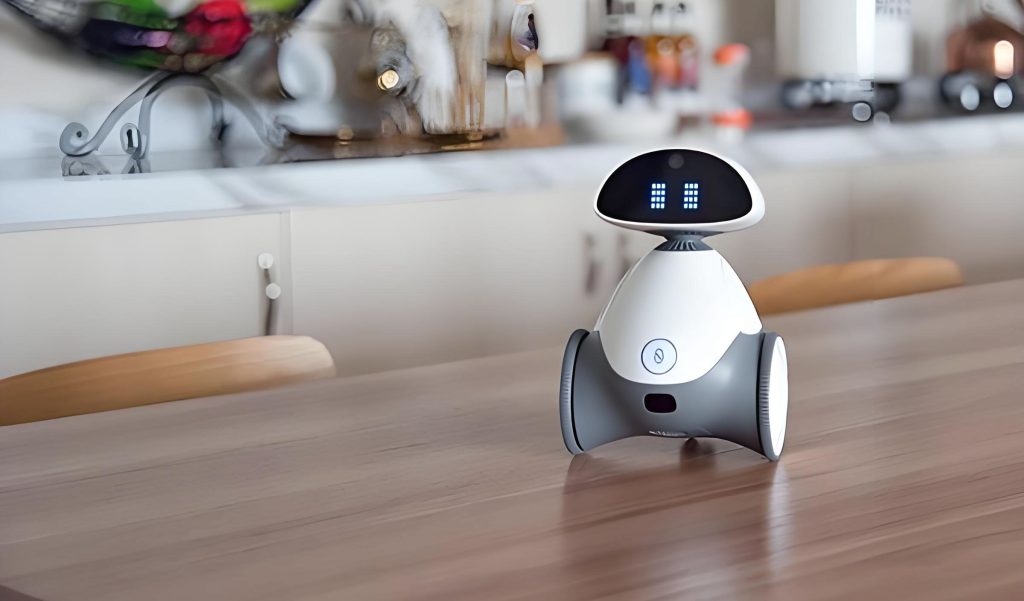
The physical embodiment of the companion robot is critical to its acceptance and perceived role. The design must avoid sterility and intimidation, instead fostering feelings of safety, familiarity, and warmth.
The Dominance of Soft Curves: The formal language is dominated by continuous, gentle curves rather than sharp edges or complex geometries. This approach aligns with biophilic and organic design principles, which are known to have calming effects. The emotional impact of a curved, friendly silhouette can be contrasted with a sharp, mechanical one. We can model the perceived “friendliness” \(F\) of a form as a function of its curvature complexity \(C_c\), proportion scale \(P_s\) (relative to human size), and surface continuity \(S_c\):
$$ F \propto \frac{S_c \cdot (1 – P_s)}{C_c} $$
Where a lower curvature complexity (smoother curves), a moderate, non-threatening scale, and high surface continuity contribute to a higher friendliness score. This guides our design towards simple, flowing surfaces.
Anthropomorphic Cues & Scale: A bipedal, humanoid-inspired form factor is chosen not for complex human-like movement, but for intuitive social affordances (a clear “front,” “face,” and ability to make “eye contact” via its screen) and stable mobility. The height is carefully calibrated to approximately 110cm, allowing the screen to be at a comfortable viewing angle for a seated or slightly stooped user, and its shoulder/arm structure to serve as a natural handhold at waist height. The size is compact enough for domestic navigation but substantial enough to imply stability and presence.
Materiality & Color: The primary material is matte-finish ABS plastic, chosen for its durability, light weight, and ease of forming smooth curves. The color palette is soft and neutral. A warm white or light grey forms the base, accented with subtle, cheerful hues like pastel yellow or blue on non-critical interactive elements. This avoids clinical whiteness while maintaining high visibility and a clean, unobtrusive appearance. High-contrast, dark elements are reserved for the screen border and sensor areas to frame the interactive zones clearly.
Integrated Feature Design: Every functional requirement is woven into the curved aesthetic. The front torso panel houses the primary display and front-facing camera subtly. Storage compartments for medical devices are integrated into the lower arm volumes, with opening mechanisms that are flush with the surface. The handhold is a gracefully curved ridge along the upper “back” and “shoulder,” ergonomically shaped to fit a aging hand’s grip. Sensors for navigation are discreetly embedded within the head and base units. The result is a cohesive object where technology is enveloped by a gentle, approachable form, making the companion robot a welcome presence rather than a conspicuous appliance.
Conclusion and Broader Implications
This user-centered exploration demonstrates that the design of an effective domestic companion robot for the aging population is a deeply interdisciplinary challenge, fusing gerontology, interaction design, robotics, and emotional design. The proposed framework, moving from empathetic research through modeled requirements to a cohesive interactive and physical design, provides a viable blueprint. The resulting companion robot concept transcends being a mere cluster of assistive functions; it is conceived as a unified actor in the senior’s life—a health aide, a memory prompt, a communication bridge, a mobility support, and crucially, an affective presence. By prioritizing intuitive voice interaction, embedding health monitoring into daily routine, offering physical stabilization, and expressing empathy through form and feedback, such a robot can significantly enhance autonomy, safety, and psychological well-being.
The development and adoption of such technologies also carry wider societal implications. They can alleviate pressure on formal care systems and empower families to provide better remote support. However, ethical considerations regarding privacy, data security, and the nature of human-robot relationships must be rigorously addressed in parallel. Ultimately, a well-designed companion robot does not replace human contact but enriches the ecosystem of care, allowing seniors to age in place with greater dignity, connection, and joy. It represents a meaningful step towards a future where technology serves our humanity with sensitivity and grace, meeting us not at the cutting edge of complexity, but at the heart of fundamental human need.